🌱 Get Outside and Touch Some Grass 🌱


For an IT pro, it’s easy to find yourself glued to a screen, solving problems, building systems, securing networks, etc…

Technology is not just our career, for many of us, it’s our passion.

But it’s important to remember, we’re human first, technologists second.
Stepping away from the keyboard and spending time outside isn’t just a luxury, it’s essential.

Fresh air, natural light, and the simple act of disconnecting help reset our minds, reduce burnout, and spark creativity.

Some of my best ideas and most productive solutions have come not from sitting at a desk, but from a long hike, going out fishing, or just sitting in the park and listening to birds sing.

If you’re feeling stuck, overwhelmed, or tired, consider this a reminder.

Get out and touch grass!

Your mind and your career will thank you for it.

hashtag#ITLife hashtag#WorkLifeBalance hashtag#MentalHealthMatters hashtag#TechProfessio

🎰 Why the Casino & Gaming Industry Is a Great Starting Point for an IT Career.

Breaking into the IT field can be daunting, but starting your career in the casino and gaming industry might just be the launchpad you didn’t know you needed.

Casinos are fast paced, highly dynamic environments that run 24/7, blending elements of financial systems, hospitality, entertainment, and marketing. This intersection creates a uniquely complex and technology driven ecosystem. The industry offers professionals a chance to build both technical and operational experience from day one.

Here’s why it’s worth considering:

🔧 Hands-On, Onsite Experience
Unlike remote roles where visibility into infrastructure is limited, working onsite in a casino means you’re in the trenches. You gain direct exposure to everything from network topology and access control systems to POS systems, surveillance infrastructure, and compliance monitoring. That kind of tactile experience builds a solid foundation.

🌐 Exposure to Diverse Tech Stacks
Casinos rely on a wide range of technologies, including:
Virtualized server environments (VMware, Hyper-V)
High-availability networking and redundant infrastructure
Enterprise Wi-Fi, VoIP, and IPTV systems
Security Information and Event Management (SIEM) platforms
Integration with third-party loyalty and marketing platforms
Real-time transactional databases and analytics tools

🎯 Learn to Support Mission-Critical Systems
In this industry, uptime is non-negotiable. Supporting gaming and financial systems trains you to think in terms of resilience, compliance, and performance. These are skills that translate across nearly every enterprise vertical.

🎥 Blending Security, Entertainment & Marketing
Where else do you get to support a hybrid environment that merges high-stakes financial transactions with entertainment systems and guest experience technologies? You’ll work cross-functionally with surveillance, marketing, and hospitality teams, gaining business context that many entry-level tech roles overlook.

Tribal-Adjacency

Last but not least, many Casinos are tribal owned. This fact can give you cultural and functional insight into how Tribal-government entities operate, opening even more career opportunities in things like Tribal Development, Tribal Government contracting, Gaming Commission and Compliance oversight, and the list goes on. It’s also gratifying knowing that you are part of a tribal journey that brings economic prosperity to a group of people that are aspiring to rebuild and grow their ancestral community.

The casino world isn’t just about games, it’s a proving ground for IT professionals who want to grow fast and build versatile skills.

#InformationTechnology #ITCareers #CasinoIndustry #TechInGaming

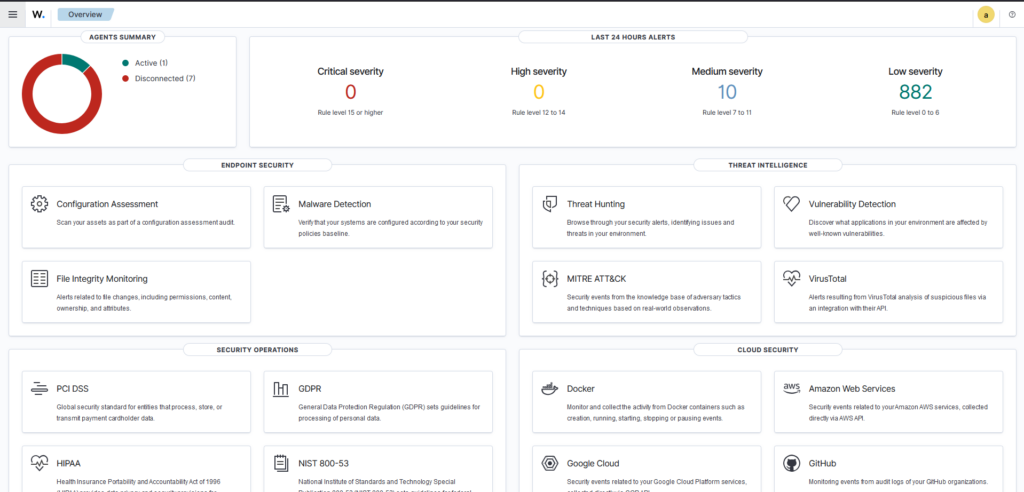
Wazuh XDR Security information and event management lab

Key Technologies:

Accomplishments:

  • Configured and Implemented SIEM/XDR security monitoring system and agents to effectively manage security across an array of connected devices.
  • Implemented active-response rules to prevent and deter attackers utilizing brute-force techniques from accessing personal and lab related devices.
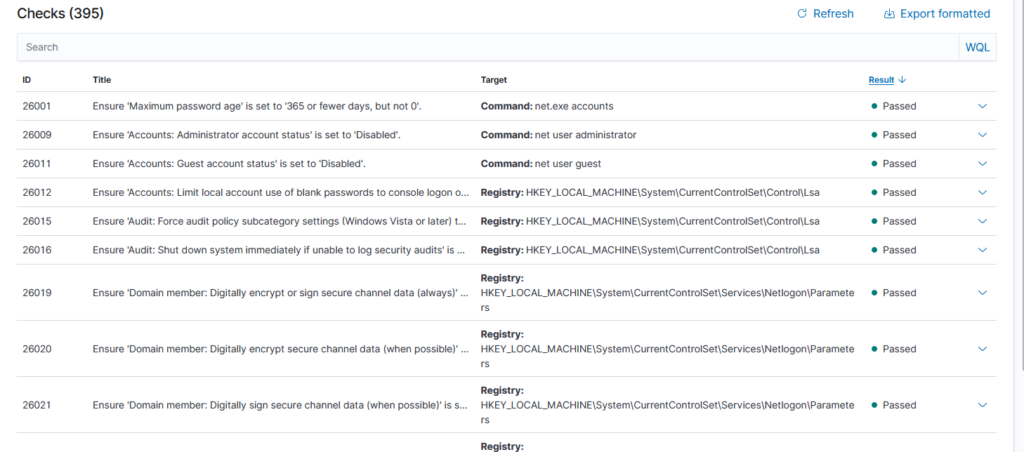
  • Leveraged CIS Benchmarks in order to harden connected devices, preventing attackers from leveraging known vulnerabilities to access personal and lab connected systems.
  • Implemented and monitored FIM database to document and prevent unauthorized file system changes and system compliance anomalies.

Windows Server 2019 Domain Controller Virtual Lab

Key Technologies:

  • VMWare Workstation Pro 17.6.1
  • Windows Server 2019 Desktop Evaluation Edition
  • Windows 11 Enterprise Evaluation edition
  • Active Directory Domain Services
  • Active Directory DNS services
  • Active Directory Users and Computers
  • Group Policy Management
  • SMB 3.1.1

Accomplishments:

  • Configured, Enabled, and Implemented Windows Server 2019 domain controller inside of a NAT network configured using VMware Workstation Pro 17.6.1
  • Installed and Configured two Windows 11 enterprise client systems within the same Subnet.
  • Enabled and configured DNS services for Windows Server 2019.
  • Configured Users and Groups within Active directory Users and Computers to allow for two domain user level accounts as well as an additional administrator level account for access to my domain.
  • Configured DNS on adjacent virtual client systems and successfully joined the devices to the domain using previously created accounts.
  • Created and Shared a centralized filesystem to these systems utilizing SMB 3.1.1

Personal Website Reverse Proxy and Domain management

06/01/2024 – present

Key Technologies:

  • Domain Registrar: GoDaddy.com
  • Dynamic DNS service: PFSense 2.7.2-RELEASE(amd64)
  • Reverse Proxy: HAproxy 0.63_2 hosted on PFSense
  • Personal Website: https://nawalker.work
  • Web Services: WordPress (TrueNAS Scale Dragonfish-24.04.2)
  • PKI/Digital Certificates: ACME Certificate Management Environment
  • SSL Offloading/HTTPS: HAproxy Reverse Proxy.

Accomplishments:

  • Acquired Domain Name using Godaddy’s domain registration system and implemented Dynamic DNS services using PFsense to ensure WAN IP address is always associated with domain, even if it changes.
  • Implemented WordPress HELM package using TrueNAS scale, allowing me to host this website on my own server from home.
  • Configured Front and Back-end access control lists using HAproxy allowing access to https://nawalker.work without opening and forwarding specific ports on my network.
  • Applied Digital Certificate to my site using ACME Certificate Management Environment to all secure encrypted access to https://nawalker.work over the web.
  • Implemented SSL offloading using HAProxy to allow packet inspection using SNORT IPS to prevent unauthorized and malicious traffic from entering the network.
  • Configured and Designed Personal Website using WordPress.

Virtualized Stateful Firewall with PFSense.

07/01/2023 – present.

Key Technologies:

  • Level 1 Hypervisor: Proxmox 7.4-18
  • Virtual Machines: PFSense 2.7.2-RELEASE (amd64)
  • WAN IP Pass-through: ATT BG-320 Fiber Router/Modem
  • Stateful Firewall: PFSense 2.7.2-RELEASE (amd64)
  • Intrusion Prevention System: SNORT 4.1.6_17
  • PKI Certificate Management

Accomplishments:

  • Implemented Dynamic MAC based IP address pass-through to ensure that WAN address is consistently assigned to the PFsense firewall.
  • Installed and Configured PFSense Firewall inside of a virtual machine using Proxmox.
  • Assigned primary NIC to PFSense firewall ensuring that all WAN traffic enters and exits the firewall.
  • Configured firewall LAN interface rules to ensure traffic security and to prevent unnecessary IP address ranges from creating inbound connections to the network.
  • Created Management VLAN to allow traffic to Proxmox from specific devices to ensure connectivity should the firewall ever fail or become misconfigured.
  • Installed and configured SNORT IPS package to assist with automated traffic analysis and to prevent network intrusions from bad actors attempting to access my network over WAN address.
  • Installed and configured ACME certificate management environment to create and manage certificates, enabling HTTPS encryption for sites and services on my network.

The Power Of Pfsense.


For most users, it’s not uncommon to rely on the basic router provided by our Internet Service Providers (ISPs). However, this device has limited functionality which often means sacrificing advanced features and robust security measures that can leave your home network vulnerable.
Pfsense is a powerful open-source firewall and routing platform that can unlock a world of benefits for your home network, and it’s totally free if you run it on your own hardware.

I’ve been using Pfsense to protect my home network for roughly a year at this point, so I wanted to write this article to summarize my feelings on the appliance, and to convey how it’s benefited my home network as a whole.

Unlocking Advanced Features

One of the most significant advantages of using Pfsense is the ability to access advanced features that are not typically available through standard ISP router devices.

With Pfsense, you can:

  • Configure complex routing rules and sub-netting schemes to optimize your network’s performance, security, and organization.
  • Easily set up site-to-site VPNs for secure external access, allowing friends and family to connect to your home network without compromising security. Options include Ipsec, OpenVPN, and Wireguard packages all natively available using Pfsense.
  • Host services within your network, such as file sharing or media streaming, while keeping them protected from the outside world using firewall rules, reverse proxies like Haproxy, and IP Whitelisting.

These features not only enhance the functionality of your home network but also provide a level of customization and security that is largely unachievable using most ISP routers that are available.

Enhanced Security

In today’s increasingly complex online landscape, security is more crucial than ever. With Pfsense as your dedicated firewall, you can rest assured that your home network and devices are better protected against the mounting risks posed by the internet. By utilizing utilities like SNORT, you can:

  • Analyze traffic flowing to and from your network in real-time, allowing you to identify potential threats before they become major issues.
  • Create block lists for known bad actors, preventing malicious traffic from ever reaching your family or servers.
  • Block traffic based on a consistently updated rule-set by automating ACLs.
  • Perform deep packet analysis to prevent malware from ever making it to or from devices on your home network.

Traffic Flow Control

One of the most powerful features of Pfsense is its ability to control and prioritize traffic flow across your network. With tools like Traffic Shaping and QoS (Quality of Service), you can allocate bandwidth and resources to specific devices, applications, or services based on their priority level. This means that critical traffic, such as voice, video streaming, or online gaming, gets the fastest and most efficient throughput, while less critical traffic is relegated to a lower priority. This level of control allows you to optimize your network’s performance, ensuring that your devices receive the bandwidth they need to run smoothly.

Easy Traffic Management

Pfsense also provides an intuitive interface for managing traffic flow across your network. With features like Traffic Rules and Bandwidth Graphs, you can easily monitor and manage traffic patterns in real-time. This allows you to identify potential bottlenecks or issues before they become major problems, making it easier to troubleshoot and resolve any issues that may arise. Whether you’re looking to prioritize specific devices or services, or simply want to monitor your network’s performance, Pfsense provides a level of traffic management that is unmatched by standard router.

Conclusion

After using Pfsense for the last year I can safely say it has changed the way that I approach SOHO networking, It’s free to install on any device or virtual appliance ( using a hypervisor like Proxmox is easier than you’d think ) and dedicated appliances can be purchased directly through Netgate, the parent company. I’ve learned a lot while using Pfsense, and am excited to continue diving into firewalls as a means of securing network traffic, both in the enterprise, and at my home.

Thanks for reading!