

Start Small, Think Big… 🦾

It’s incredible how much you can accomplish with determination and repurposed hardware.

I started my lab three years ago, with a single used desktop workstation from my local enterprise recycling company, thanks Comprenew, and a network switch. From that modest setup, I’ve built a full home lab environment that mirrors many enterprise setups. The fact is, you do not need a massive budget to start learning and innovating.

Pickup a refurbished system with enough SATA ports for a boot drive and a few refurbished NAS drives, plus at least two network interface cards, and your possibilities are truly massive.

Here’s what I’m currently running, on that very machine:

🔹A Proxmox Server Solutions VE server hosting my VMs and LXC containers.

🔹A TrueNAS Scale virtual machine acting as my NAS, and docker container host.

🔹My Netgate PFSense firewall VM to manage and protect my network from the baddies. 🔥

🔹A Secure, remote access VPN, using WireGuard. 🔐

🔹My dashboard splash page for centralized access to all of my services using Dashy

🔹A Pi-hole container for network-wide ad blocking, and DNS look-ups. 🥧

🔹Cloudflare tunnels for secure, proxied access to my sites and services. 😶‍🌫️

🔹My personal website, hosted in Docker, Inc. 🕸️

🔹My Jellyfin Project media server for streaming all my own content to my family and friends. 🪼

🔹An Immich photo storage server for organizing and backing up my photos.

🔹Wazuh XDR for endpoint security monitoring and analysis across all of my systems.

🔹Syncthing for secure, decentralized file syncing across my network.

🔹An OpenWebUI server integrated with an Ollama API to interact with self-hosted LLMs through a clean and intuitive interface. 🤖✨

To ensure resiliency, I back everything up through a Proxmox Server Solutions Backup Server that stores snapshots to an SMB share hosted on a secondary system.

What started with just a vision has grown into a versatile, self-sufficient infrastructure, entirely self-hosted, secure, and scalable. ⚖️

If you’re thinking about building your own lab, don’t wait for the “perfect” equipment or conditions. Start with what you have, be resourceful, and keep learning. The skills you will develop along the way will bolster your confidence and inspire you to do more.

If you’re looking to start-up your own lab, and have any questions about how you can get started, feel free to contact me I’m always happy to point others to the resources that have helped me out along the way. 🤟

#Homelab #Networking #SelfHosting #Virtualization #Cybersecurity #Proxmox #TechInnovation #LearningByDoing
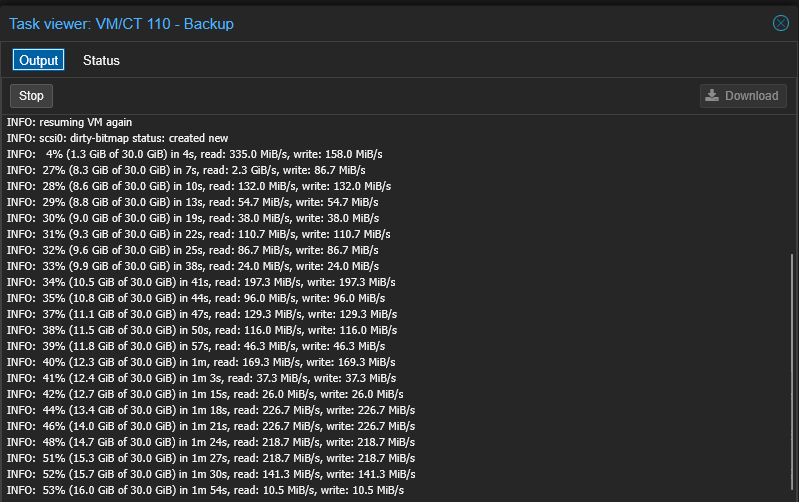

🚨 Backups Matter, Even at Home! 🧑‍💻💾

There’s a fine line between a homelab and a production environment, and I think I may have crossed it…
With so many essential services that my family and I use daily hosted
internally, including DNS, media, monitoring, firewalls, and networking,
you name it, having a reliable backup strategy isn’t just a best
practice at my house.

It’s become mission-critical. This week I finally got my Proxmox Backup Server up running, and am now successfully backing up all of my VM workloads. ✅

But it doesn’t stop at just having backups, the real value lies in testing them.

Here’s an effective method I’ve adopted to ensure that my backups will work when I need them most: ➡️ Clone a production VM
➡️ Make a snapshot of the machine
➡️ Make breaking changes to the clone
➡️ Attempt a full restore from backup
➡️ Finally, confirm everything comes back online as expected.
These dry-run validations ensure that snapshots and backups are actually
usable when I need them most, after all discovering they’re incomplete
after a failure is not the time to find out. 😬


Whether you’re running a data-center or hosting a homelab that your household
has come to rely on, do your best to build resilience and verify
recovery methods, before you need them.


Your future self will thank you.

Homelab Proxmox Backups ITInfrastructure SysAdmin DisasterRecovery

💥 Today I broke my lab… and learned a lesson in the process. 😅

This morning, I connected to my home network over my wireguard tunnel to make some experimental changes to my proxmox host.

Things went well, until they didn’t. I reconfigured the management interface for a project and suddenly, my entire home network went dark.

No access. No response. No turning back… yet.

I figured, “no problem I’ll just fix it when I get home”. Of course, the rollback didn’t go as planned, and that’s when the real troubleshooting began.

I dove deep:

🔍 Scrubbed my VXLAN configs (OVS interfaces)
🔍 Rebooted EVERYTHING.
🔍 Dug through /etc/hosts on Proxmox
🔍 Double-checked all of my bridge interfaces.
🔍 Ensured /etc/network/interfaces and /etc/resolv.conf were configured properly, etc..

Of course at this point the kiddos needed my attention, so in between feeding them, playing with them, and wiping their… “tears” lol, I found little bits of time to keep working on a solution.

Still nothing.

After hours of spiraling through potential worst-case scenarios, I finally looked at my pfSense firewall’s default gateway.

There it was, the WAN gateway had picked up the IP assigned to the gateway on my Wi-Fi network (which is in a subnet separate my main network).

Because I use IP-Passthrough and DHCP on my WAN interface to stay resilient against ISP changes, the system had gone rogue.. it picked up the wrong interface for it’s gateway, and dropped everything.

I fixed the WAN gateway and like magic, the network sprang back to life.

Lessons learned:

1. Never overlook the basics, even when you think their covered. (looking at you, default gateway)

2. Dynamic environments require extra attention to how components resolve IPs and routes, especially when you have a lot of virtualized appliances thrown into the mix.

3. Don’t be afraid to break things, just be prepared for real-world chaos when you do 😉


This is why I love working in IT, and working in my lab. Never stop learning, every misstep is an opportunity to understand your systems a little better.

hashtag#homelab hashtag#networking hashtag#Proxmox hashtag#pfSense hashtag#WireGuard hashtag#ITLife

Are you being respectful in the workplace?


Just hear me out… respect in the workplace isn’t just about how we speak to one another. It’s also about how we work with one another.

As an IT professional, I’ve come to realize that one of the most overlooked forms of respect, is respect for the process.

Things like using the ticketing system instead of calling or messaging someone directly about an issue. Following established procedures rather than taking shortcuts. Looping in the IT team before making technical changes, especially when those changes can affect systems or impact security.

Too often, these steps are seen as bureaucratic hurdles instead of what they really are: safeguards. They’re in place to protect the business, ensure uptime, and keep things secure and compliant.

When people bypass the process, it might seem harmless, and even helpful, but the truth is that it can create confusion, increase risk, and frankly make it harder for IT teams to do their jobs effectively.

Respecting the work of IT means respecting the “why” behind the systems and procedures we’ve put in place.

So if you’re ever unsure whether to make that quick change yourself, or you’re tempted to “just ask a favor” instead of submitting a ticket, take a step back.

Ask yourself “Does what I’m doing reflect an attitude of trust and respect for my IT department?”

This basic form of professional courtesy can go a long way, and it makes everyone’s job easier.

hashtag#IT hashtag#WorkplaceRespect hashtag#ProcessMatters hashtag#Collaboration hashtag#EnterpriseIT